APM?
"애플리케이션의 성능을 실시간으로 모니터링하고 분석할 수 있는 도구"
APM은 말 그대로 애플리케이션이 실제로 어떻게 작동하고 있는지를 실시간으로 추적하고 시각화해서, 성능 문제를 조기에 감지하고 대응할 수 있게 도와주는 도구이다.
APM을 통해 고객이 지속적으로 긍정적인 경험을 얻도록 개선할 수 있다.
APM이 하는 일
- 트랜잭션 추적
- 요청이 어디서 지연되는지를 추적 (예: DB, 외부 API 등)
- 메트릭(Metrics) 수집
- CPU, 메모리, 요청 속도, DB쿼리 시간, 에러율 등 수집
- 에러 추적
- 예외 발생 위치, 스택 트레이스, 요청 context 제공
- 슬로우 쿼리 감지
- 느린 DB 쿼리 또는 API 응답 시간 추적
- 분산 추적 (Distributed Tracing)
- MSA 환경에서 서비스 간 흐름 추적
- 알림
- 성능 임계값 초과 시 Slack, 이메일 등으로 알림 전송
- 대시보드
- 실시간 성능 지표와 로그를 시각적으로 제공
- 사용자 경험
- 페이지 로딩 속도, JS 오류 등 프론트엔드 포함
대표적인 APM 도구들
| APM 도구 | 특징 | 사용 상황 |
| New Relic | 매우 강력한 APM, MSA 전체 추적 가능, 요금제 비쌈 | 대기업, 고도화 서비스 |
| Datadog APM | 인프라 + APM 통합, 시각화 훌륭, 다양한 연동 | Kubernetes, AWS 등 클라우드 서비스 |
| Sentry | 프론트/백엔드 통합 추적, 성능 추적기능도 포함 | Node.js, React, Vue 등 JS 기반 서비스 |
| Elastic APM (ELK스택) | 오픈소스 기반, Kibana로 대시보드 구성 | 자체 구죽 가능한 환경 |
| Jeager | CNCF 분산 트레이싱 시스템 | MSA 환경, 비용 없이 분산 추적 원할 때 |
| Zipkin | Twitter 오픈 소스, Jaeger과 유사 | 가볍게 추적용 분산 트레이싱 |
| OpenTelemetry | 벤더 독립 표준, 다양한 APM으로 전환 가능 | NewRelic, Datadog, Prometheus 등과 연동 가능 |
이중에서 자주 듣고 접했던 건 Sentry, Datadog이고 직접 사용해본건 ELK 스택, Prometheus + Grafana 조합 정도 인 것 같다.
이번 글에서는 Sentry 에 대해 알아보고자 한다.
Sentry
sentry?
Application Performance Monitoring & Error Tracking Software
Application performance monitoring for developers & software teams to see errors clearer, solve issues faster & continue learning continuously.
sentry.io
- Install
npm install @sentry/node @sentry/tracing
- 커스텀 에러 스크립트 생성
// DB 관련 에러 커스텀 클래스
import { Logger as TypeOrmLogger, QueryRunner } from 'typeorm';
import * as Sentry from '@sentry/node';

export class SimpleTypeOrmSentryLogger implements TypeOrmLogger {
  private readonly slowQueryThreshold = 300; // ms 기준

  logQuery(query: string, parameters?: any[], queryRunner?: QueryRunner) {
    const start = Date.now();
    console.log('[QUERY]', query);
    if (queryRunner) {
      queryRunner.data = {
        ...(queryRunner.data || {}),
        __sentryQueryStart: start,
        __sentryQuery: query,
        __sentryParams: parameters,
      };
    }
  }

  logQueryError(error: string | Error, query: string, parameters?: any[]) {
    const err = error instanceof Error ? error : new Error(error);
    Sentry.captureException(err, {
      extra: {
        query,
        parameters,
      },
    });
  }

  logQuerySlow(time: number, query: string, parameters?: any[]) {
    console.log('[SLOW QUERY]', query);
    if (time > this.slowQueryThreshold) {
      Sentry.captureMessage(
        `[SLOW QUERY] ${time}ms\n${query}\nParams: ${JSON.stringify(parameters)}`,
        'warning',
      );
    }
  }

  log(level: 'log' | 'info' | 'warn', message: any) {
    if (level === 'warn') {
      Sentry.captureMessage(`[TypeORM Warn] ${message}`, 'warning');
    }
  }

  logMigration(message: string) {
    console.log('[Migration]', message);
  }

  logSchemaBuild(message: string) {
    console.log('[SchemaBuild]', message);
  }
}
// API 에러 커스텀 클래스
import {
  ArgumentsHost,
  Catch,
  ExceptionFilter,
  HttpException,
  HttpStatus,
} from '@nestjs/common';
import { HttpAdapterHost } from '@nestjs/core';
import * as Sentry from '@sentry/node';

@Catch()
export class ExceptionsFilter implements ExceptionFilter {
  constructor(private readonly httpAdapterHost: HttpAdapterHost) {}

  catch(exception: any, host: ArgumentsHost) {
    Sentry.captureException(exception);
    // In certain situations `httpAdapter` might not be available in the
    // constructor method, thus we should resolve it here.
    console.log('in exception filter');
    const { httpAdapter } = this.httpAdapterHost;
    const ctx = host.switchToHttp();

    const httpStatus =
      exception instanceof HttpException
        ? exception.getStatus()
        : HttpStatus.INTERNAL_SERVER_ERROR;

    const responseBody = {
      statusCode: httpStatus,
      error: exception instanceof Error ? exception.message : exception,
      message:
        exception instanceof Error
          ? exception.message
          : 'Internal Server Error',
      timestamp: new Date().toISOString(),
      path: httpAdapter.getRequestUrl(ctx.getRequest()),
    };

    httpAdapter.reply(ctx.getResponse(), responseBody, httpStatus);
  }
}
위 처럼 커스텀 클래스를 생성해서 API 에러나 슬로우 쿼리, 쿼리 에러로그를 테스트 해보았다.
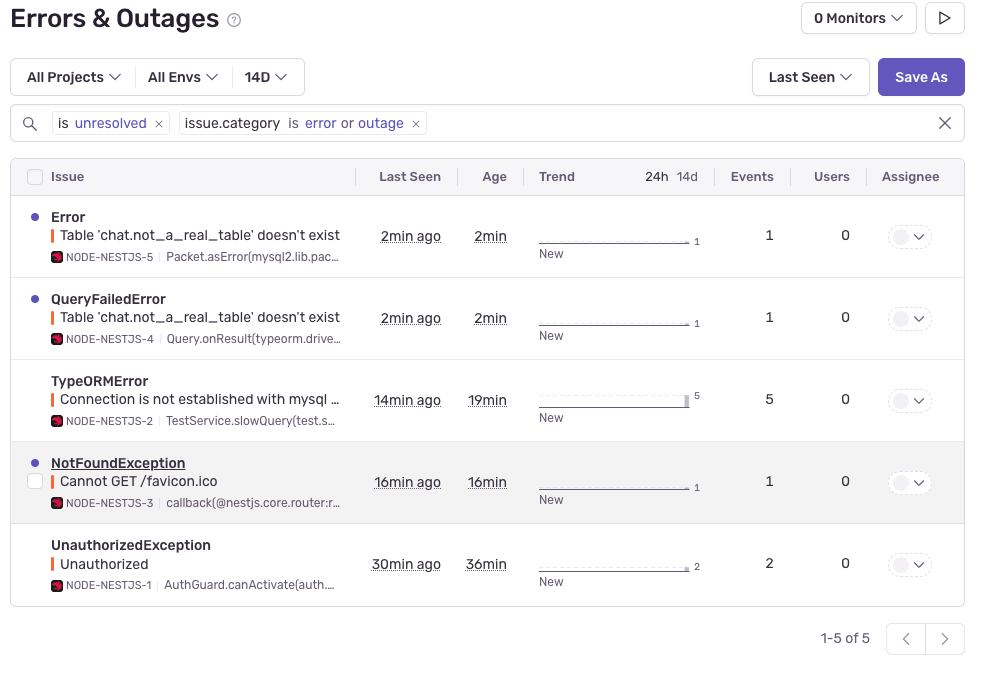
정리
APM이 어떤것인지, 그리고 전반적으로 가장 많이 사용되는 Sentry를 통해 간단한 테스트를 진행해보았다.
실제 서비스에서 추가하면 좋을 것들
- 트랜잭션 데이터
- API 요청별 처리 시간 및 경로 추적
- 각 서비스 또는 마이크로 서비스 호출 간의 연쇄호출
- 복잡한 비즈니스 로직의 경우 트랜잭션 시작부터 끝까지 지연 시간 병목 구간 파악
- 에러 및 예외
- 발생환 예외 및 오류 로그, 에러 빈도 수집
- 메트릭 (Metrics)
- 응답 시간, 처리량, 네트워크 I/O
- DB 쿼리 실행 시간 및 빈도
- 로그
- 애플리케이션로그 (info, warn, error)
- 컨텍스트가 포함된 구조화 로그
- 요청 및 응답 로그
- 인프라 및 시스템 상세정보
- 서버 및 컨테이너 상태 (CPU, 메모리, 디스크, 네트워크)
- 서비스 상태 및 가용성
- 오케스트레이션 상태 (ex: 쿠버네티스 pod 상태)
'BackEnd' 카테고리의 다른 글
| Redis를 "그냥" 쓰고 있지는 않는가 (1) | 2025.08.02 |
|---|---|
| [간단 정리] gRPC 는 무엇인가 (REST와의 비교, nestjs) (3) | 2025.07.24 |
| [Redis] Redis, Redis Pub/Sub (Redis Stream) (0) | 2025.06.06 |
| 소프트웨어 아키텍처 (Software Architecture) (0) | 2025.01.16 |
| 디자인 패턴 (0) | 2025.01.14 |